
Article
How to Prepare for a Recorded Video Interview
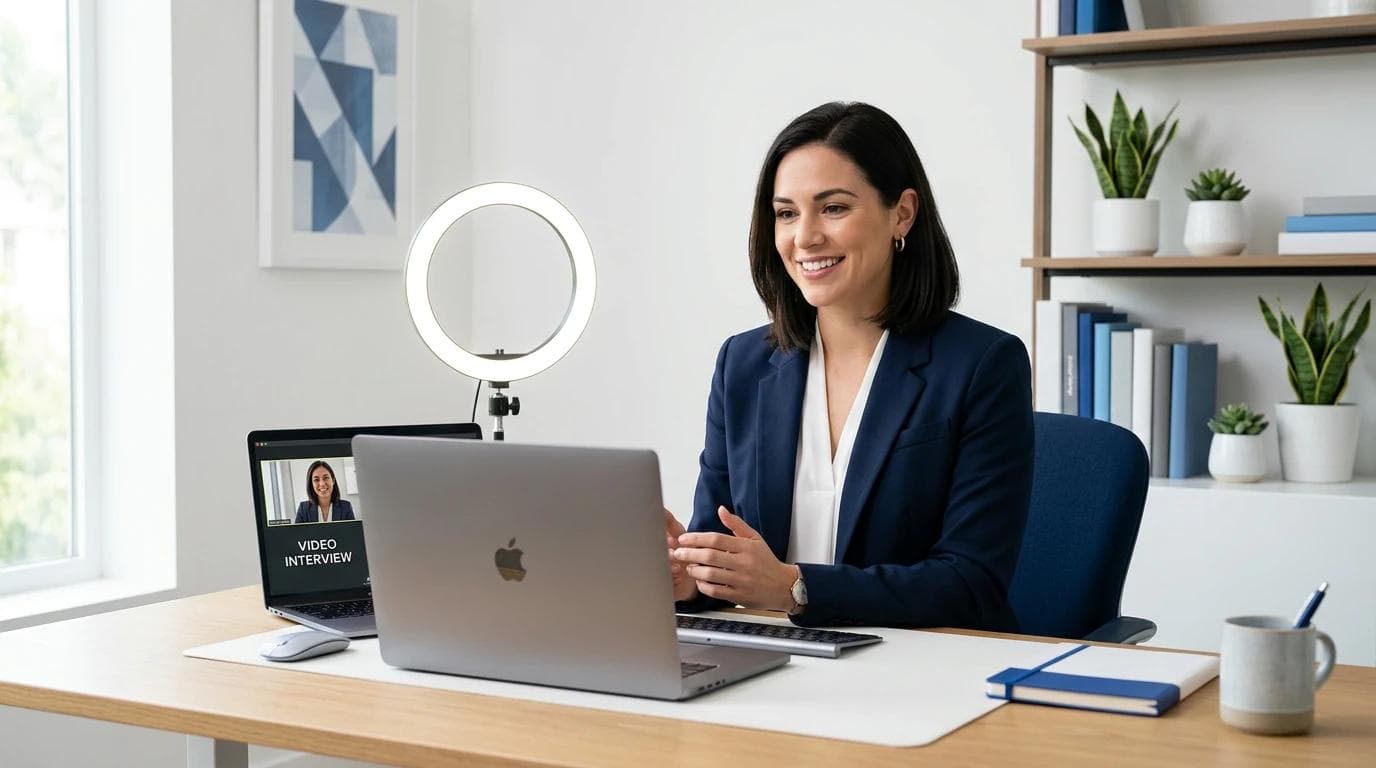

Preparing for a recorded video interview requires more than practicing answers. You need to understand the interview format, communicate your skills clearly, test your technology, and present yourself professionally on camera. Whether you are applying for your first job, pursuing a remote position, or advancing your career, the right preparation can help you make a strong impression.
This guide explains how to prepare for a recorded video interview, avoid common mistakes, and demonstrate your qualifications with confidence.
1. Understand the Recorded Video Interview Format
A recorded video interview allows candidates to answer interview questions by recording their responses rather than speaking directly with a recruiter in real time. Employers often use this format to evaluate applicants before scheduling live interviews.
There are two common types:
One-way video interviews: You receive questions and record your answers within a specified time limit.
Live video interviews: You answer questions in real time through a video conferencing platform.
Before starting, review the employer's instructions carefully. Find out whether you can re-record answers, how much preparation time is available, and whether the platform has a deadline.
Understanding these details helps you plan your preparation and avoid unnecessary stress.
2. Research the Company and Job Description
Researching the employer helps you provide relevant answers instead of relying on generic statements.
Start by reviewing the company's official website, services, mission, recent updates, and workplace culture. Then read the job description carefully to identify the skills, responsibilities, and qualifications the employer emphasizes.
Create a list of three to five important requirements and prepare examples that demonstrate your abilities in those areas.
For example, if the role requires problem-solving, prepare a story about a challenge you faced and how you resolved it. If communication is essential, describe a situation in which you explained a complex idea or worked successfully with a team.
Your answers should demonstrate why your experience and skills make you a suitable candidate.
3. Practice Common Video Interview Questions
Practicing common interview questions helps you organize your thoughts and respond naturally under time pressure.
Consider preparing answers to these questions:
Tell us about yourself.
Why are you interested in this position?
What are your greatest strengths?
Describe a challenge you overcame.
Why should we hire you?
How do you manage deadlines and competing priorities?
What do you know about our company?
What are your professional goals?
Use the STAR method when answering behavioral questions:
Situation: Explain the background.
Task: Describe your responsibility.
Action: Explain the steps you took.
Result: Share the outcome or what you learned.
For example, when discussing a challenging project, briefly explain the problem, describe your contribution, and highlight the measurable result if one is available.
Practice your answers aloud rather than memorizing every word. This approach helps you sound authentic and makes it easier to adapt when the actual questions differ from your expectations.
4. Set Up a Professional Recording Environment
Your recording environment can influence how clearly employers see and hear you. Choose a quiet, well-lit location where you can speak without interruptions.
Follow these practical guidelines:
Lighting: Face a window or place a light in front of you so your face is clearly visible.
Background: Choose a clean, uncluttered background.
Camera position: Position your camera at approximately eye level.
Framing: Keep your head and shoulders visible, with a little space above your head.
Noise control: Turn off unnecessary notifications and reduce background noise.
Internet connection: Use a reliable connection and move closer to your router if necessary.
Record a short test video and review the lighting, framing, sound quality, and background before beginning the interview.
5. Test Your Equipment and Interview Platform
Technical problems can interrupt your performance or prevent you from submitting your answers. Test your equipment before the deadline.
Check the following:
Your webcam works correctly.
Your microphone captures your voice clearly.
Your speakers or headphones function properly.
Your browser supports the interview platform.
Your device is fully charged or connected to power.
Your internet connection is stable.
You understand how to start, stop, review, and submit recordings.
If the employer provides a practice session, use it to become familiar with the interface.
Also, check whether the platform requires camera or microphone permissions. Keep a backup device or an alternative internet connection available when possible.
6. Dress Professionally and Maintain Positive Body Language
Even though you are recording answers alone, treat the interview as a formal professional interaction.
Choose clean, well-fitting clothing appropriate for the role and company culture. Simple colors and minimal patterns generally work well on camera.
Pay attention to your body language:
Sit upright with relaxed shoulders.
Look toward the camera when delivering important points.
Smile naturally when appropriate.
Keep hand movements controlled and purposeful.
Avoid repeatedly looking away from the screen.
Speak clearly at a steady pace.
Looking directly at the camera can create the impression of eye contact with the viewer. If you need notes, place a few keywords near the camera rather than reading from a full script.
7. Structure Your Answers Clearly and Concisely
Recorded interviews often have strict response limits. A long, unfocused answer can make it harder for recruiters to identify your strongest qualifications.
A useful structure is:
Start with the main point: Answer the question directly.
Provide an example: Support your answer with relevant experience or evidence.
Explain the result: Show the value of your actions.
Connect to the role: Explain how the experience relates to the position, when appropriate.
For a question such as "Why should we hire you?", identify two or three relevant strengths and explain how they align with the employer's needs.
Respect the platform's time limits. As a practical starting point, many straightforward answers can be delivered in approximately 45–90 seconds, while complex behavioral examples may require more time if permitted.
8. Manage Nervousness and Speak With Confidence
Feeling nervous before recording an interview is normal. Because there may be no interviewer present, speaking to a camera can initially feel unnatural.
To become more comfortable, practice recording yourself answering several questions. Watch the recordings and identify one or two areas to improve, such as speaking pace, clarity, or eye contact.
Before the interview:
Take a few slow, comfortable breaths.
Review your key talking points.
Keep a glass of water nearby.
Allow yourself time to settle before recording.
Focus on communicating your value rather than achieving perfection.
If you make a small mistake, do not let it distract you from the rest of your answer. If the platform allows another attempt, use the opportunity according to the employer's instructions.
Confidence develops through preparation and practice, not through memorizing a flawless script.
9. Avoid Common Recorded Interview Mistakes
Several preventable mistakes can weaken an otherwise strong interview.
Reading directly from a script: Reading word for word can make your delivery sound unnatural. Use brief notes instead.
Ignoring the question: Answer what the employer actually asks before adding background information.
Speaking too quickly: Pause between ideas and pronounce important points clearly.
Using vague examples: Support claims about your skills with specific situations, actions, and outcomes.
Forgetting to check the recording: Review your response when the platform allows it, and confirm that your answer is complete.
Ignoring instructions: Follow all requirements regarding deadlines, time limits, retries, and file submission.
Providing exaggerated claims: Be honest about your responsibilities, achievements, and experience.
Avoiding these mistakes helps recruiters focus on your qualifications rather than preventable distractions.
10. Complete a Final Checklist Before Submitting
Before recording your official answers, review the following checklist.
I have researched the company and job description.
I have practiced common interview questions.
I have prepared relevant examples of my skills.
My camera and microphone are working.
My background is clean and my face is well-lit.
I am dressed appropriately for the role.
My device is charged and my internet connection is stable.
I understand the interview instructions and time limits.
I am speaking clearly and looking toward the camera.
I have checked that every required response has been submitted.
After submission, confirm that the platform indicates your interview is complete. Keep any confirmation message or email until the employer responds.
Conclusion
Preparing for a recorded video interview is an opportunity to demonstrate your communication skills, professionalism, and suitability for a position. By researching the company, practicing relevant answers, testing your equipment, and creating a professional recording environment, you can approach the process with greater confidence.
The most effective preparation combines clear answers with authentic delivery. Rather than memorizing every sentence, focus on understanding your strengths, providing specific examples, and explaining how you can contribute to the employer's goals.
With thoughtful preparation and a final technical check, you can make a positive impression even when the interview takes place without a live interviewer.
Frequently Asked Questions
How long should a recorded video interview answer be?
Follow the employer's time limit. For many general questions, 45–90 seconds is a useful starting point. Behavioral questions may require longer answers to explain the situation, actions, and results.
Can I use notes during a recorded video interview?
Yes, if the employer and platform permit them. Use short keywords or bullet points near your camera instead of reading a complete script.
What should I wear for a recorded video interview?
Choose professional clothing that suits the role and company culture. Solid colors, neat grooming, and minimal distracting accessories are usually good choices.
What should I do if I make a mistake while recording?
Stay calm and continue if the platform does not allow another attempt. If re-recording is permitted, use another attempt when necessary and follow the employer's instructions.
How can I make a good impression in a one-way video interview?
Research the company, answer questions directly, use specific examples, maintain good posture, look toward the camera, and speak at a comfortable pace. Clear, authentic communication is more valuable than a memorized performance.
https://www.indeed.com/career-advice/interviewing/video-interview-guide?utm_source=chatgpt.com
https://www.indeed.com/career-advice/interviewing/video-practice-interview?utm_source=chatgpt.com
https://www.indeed.com/career-advice/interviewing/virtual-interview?utm_source=chatgpt.com
https://careerservices.uni.edu/students/interviewing?utm_source=chatgpt.com
Read next
View all articles
My First IELTS Exam Experience: I Interview Thousands of Candidates, but I Was Nervous Once, Too.
My first IELTS exam experience at GREC Banani: the nerves, the test-day surprises, and a reminder for anyone facing an interview or assessment.
Read more
How to Learn Spanish One Real Conversation at a Time
Learn Spanish through useful conversations, grammar examples and a flexible daily routine. Start listening, speaking and asking questions with less pressure.
Read more
How to Learn German Without Getting Lost in Grammar
Learn German with useful phrases, grammar examples, listening practice and a simple daily routine that helps you start speaking without waiting for perfection.
Read moreExplore related career opportunities
Find roles that fit your location and interests. Each listing explains its current or planned vacancies.
All locations, roles and employment types
Comments (0)
Sign in to join the discussion.
No comments yet. Start the conversation.