
Article
How to Hire a UI/UX Designer for a Product Redesign
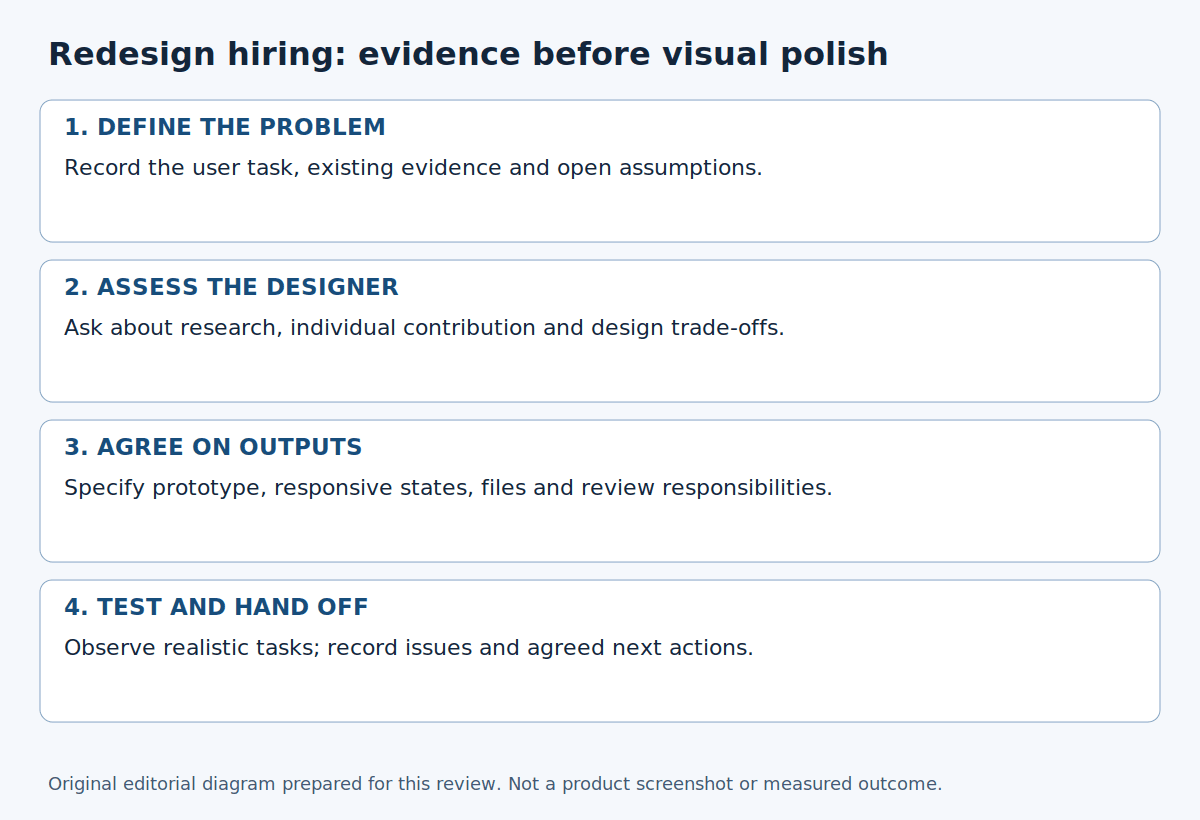
A redesign brief that says "make the app look better" leaves a designer guessing. Start with the task people struggle to complete: finding a price, booking a visit or finishing registration. The work you commission should follow from that problem.
This guide explains how to hire a UI/UX designer for a product redesign, from the first research questions to the handoff. You do not need every possible design document. You do need agreement on what the designer will investigate, what they will deliver and who can approve it.
Define the problem before looking at portfolios
Write a short description of the product, its users and the journey you want to improve. Gather support messages, existing research and any relevant analytics. Separate observations from explanations. "People leave the registration page" is an observation; "the page needs a new colour scheme" is an untested explanation.
Ask what evidence would change your team's view. A confusing instruction, missing information or an implementation defect may need a different response from a full visual redesign. The Design Council's Double Diamond starts with understanding and defining the problem before developing solutions.
Choose measures that fit the task, such as completion, errors or time taken. Establish a baseline before setting targets. A candidate can propose a way to assess a design, but should not promise a particular sales increase without evidence. Pricing, traffic and implementation can also affect the eventual result.
Agree on useful research
Ask candidates what they need to learn and why. For a subscription product with a difficult onboarding flow, that might mean reviewing support enquiries, observing the current journey and speaking to relevant users. A competitor review alone would not tell you why your own customers are stuck.
Discuss the boundaries of the research:
- Which user groups and tasks are in scope?
- What existing evidence can the designer use?
- Who recruits participants and obtains their consent?
- What access or anonymised data will the designer need?
- What findings will the team receive, and which decisions will they inform?
Match the plan to your budget and access to users. If recruitment is uncertain, agree on a smaller first phase rather than pretending the research can happen on a fixed date. Record any assumptions the designer cannot test.
Ask candidates to explain their decisions
Choose one or two case studies with similar users, difficult tasks or technical constraints. Attractive screens tell you something about visual skill. They do not show how the designer found the problem or handled feedback.
Use the same questions with each shortlisted candidate:
- What was the original problem, and what evidence supported it?
- Which decisions were yours, and which belonged to the wider team?
- What alternatives did you consider?
- What did you change after user feedback?
- How did you work with developers when a design was difficult to build?
- Which outcomes were measured, and what remains uncertain?
A candidate may be unable to share confidential files. Offer an anonymised discussion or a clearly hypothetical scenario instead. Ask them to explain a trade-off, rather than demanding unpaid production work for your own product.
Specify deliverables and file formats
List the screens, journeys and states you need. "Five screens" can conceal a lot of work if each screen also needs loading, empty, error and success states. State whether mobile and desktop views are included.
Depending on the project, useful deliverables may include a findings report, task flows, wireframes, an interactive prototype, final interface files and developer notes. Add component-library or design-token updates only when the team needs them. Research-backed audience summaries can be useful; invented personas should not be presented as findings.
Confirm the design tool, editable file format, asset specifications, accessibility expectations and ownership or licensing terms. Identify any fonts, icons or other assets that need a separate licence. If implementation is outside the designer's fee, say so. A prototype is not a working application.
For handoff, ask for interaction notes, links to the current files and a list of unresolved questions. Agree whether the designer will answer developer questions or review the implementation, and for how long.
Set review roles before work starts
Name one person who can make the final decision. Other stakeholders can contribute, but the designer should not receive conflicting instructions from several directions. Have someone combine feedback into a single written response.
Schedule reviews around decisions: research findings, an early direction, prototype testing and final handoff. Agree on revision rounds and how extra work will be quoted. If a stakeholder asks for a new journey halfway through, check the effect on cost and timing before adding it.
During interviews, ask how candidates handle a disagreement between user evidence and a senior stakeholder's preference. Listen for a clear explanation of options and consequences, not a promise to agree with everyone.
Plan usability checks
GOV.UK's moderated usability testing guidance describes observing participants as they try specific tasks. It also recommends tasks that do not hint at the answer. Use that principle when reviewing a designer's proposed test plan.
For example, ask someone to find a suitable booking and identify the total price. Do not tell them which button to press. Agree how the team will record difficulties, prioritise them and decide what to change. Retest important revisions where practical.
A small study will not establish that every user can complete every task. Ask the designer to report the participant group, tasks, observations and limitations so the team knows what the findings do and do not support.
A hypothetical booking-flow redesign
Imagine a travel company receiving enquiries from customers who cannot tell which booking step comes next. This is a fictional planning example, not a client result or Shanta's project experience.
The brief asks the designer to investigate the booking journey before proposing new screens. The first deliverable is a short report linking observed problems to available evidence. The next phase covers wireframes and a clickable prototype for the priority journey, followed by agreed mobile and desktop designs.
Suppose a test participant misses a required passenger-information field. The designer might propose a clearer label, different field grouping and more useful validation feedback. The team would check the revised interaction rather than assume that a cleaner-looking page solves it.
Handoff includes the editable files, agreed states, a decision log and outstanding issues. Any commercial outcome would need measurement after implementation. Nothing in this example establishes a conversion improvement.
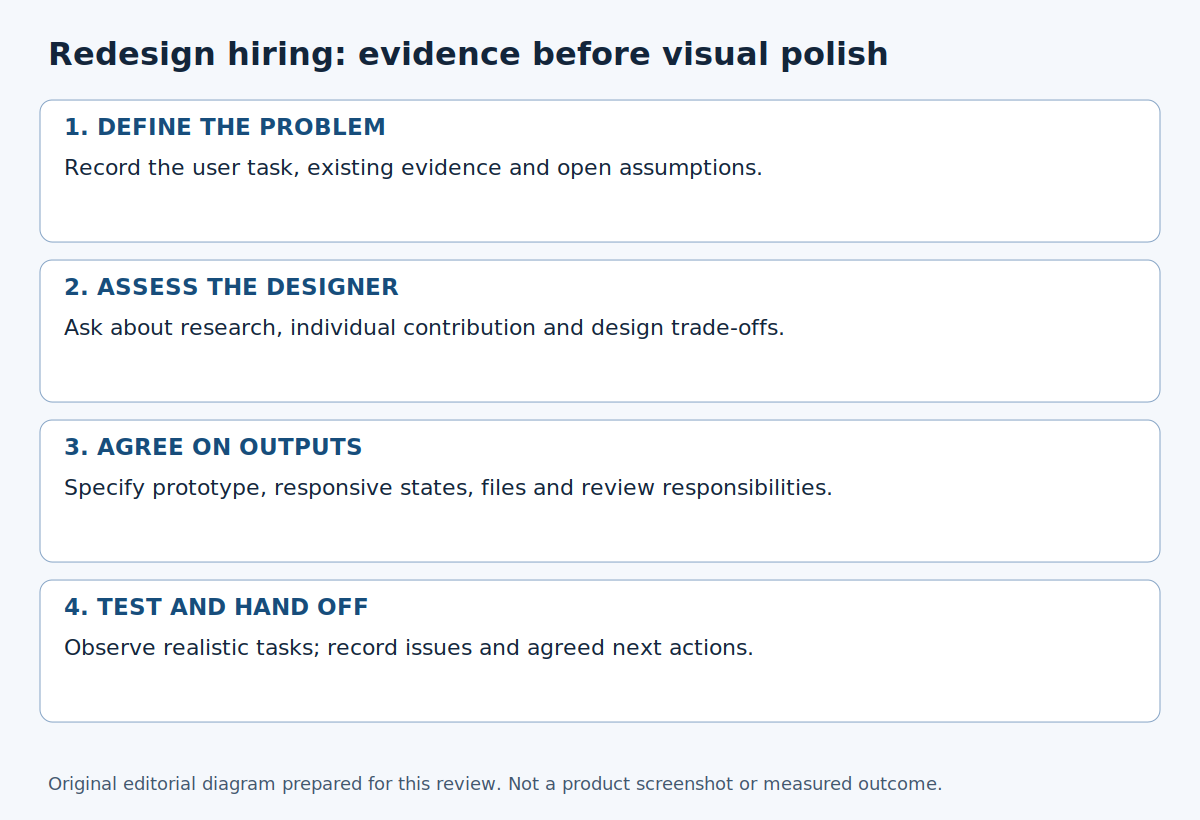
Original explanatory diagram generated for this editorial correction; not a product screenshot. The diagram contains no copied image assets. Source: this article’s worked example. No third-party image licence is asserted.
Compare candidates consistently
A sample scorecard could allocate 25 points to relevant case studies, 20 to research, 20 to interaction design, 15 to communication, 15 to handoff clarity and 5 to availability. These weights total 100; they are an editorial example, not an industry standard.
Adjust the weights before comparing candidates. A navigation problem may call for different strengths from a visual-consistency update. Record evidence beside each rating and note gaps. A high total should not hide an unresolved requirement such as availability or experience with a critical user group.
Before you hire
- State the user problem and distinguish evidence from assumptions.
- Agree on research questions, participant access and responsibilities.
- Check each candidate's own contribution to relevant case studies.
- List deliverables, states, file formats and exclusions.
- Name the decision owner and define review rounds.
- Plan usability checks, handoff and scope changes.
- Confirm budget, timing, ownership and availability in writing.
Use the brief to start your ALHarih search
Prepare your requirements with the freelance project brief guide, then explore the ALHarih talent directory. Its public page invites comparisons of skills, portfolio samples, feedback and rates. Treat those as starting points for questions, not proof that someone is available or suitable.
Browse related ALHarih articles if you need help refining the scope. Confirm current workflow and terms before committing. The public directory was checked for this guide; authenticated hiring and payment steps were not tested, and no match or project outcome is promised.
Read next
View all articles
How to Hire a Freelance Web Developer: An Evidence-Based Checklist
Learn how to hire a freelance web developer with confidence. Use this evidence-based checklist to evaluate portfolios, verify technical skills, compare proposals, assess security practices, and choose the right developer for your project.
Read more
How to Learn Spanish One Real Conversation at a Time
Learn Spanish through useful conversations, grammar examples and a flexible daily routine. Start listening, speaking and asking questions with less pressure.
Read more
How to Learn German Without Getting Lost in Grammar
Learn German with useful phrases, grammar examples, listening practice and a simple daily routine that helps you start speaking without waiting for perfection.
Read moreExplore related career opportunities
Find roles that fit your location and interests. Each listing explains its current or planned vacancies.
All locations, roles and employment types
Comments (0)
Sign in to join the discussion.
No comments yet. Start the conversation.